Showing posts with label netbooks. Show all posts

Sunday, January 3, 2010

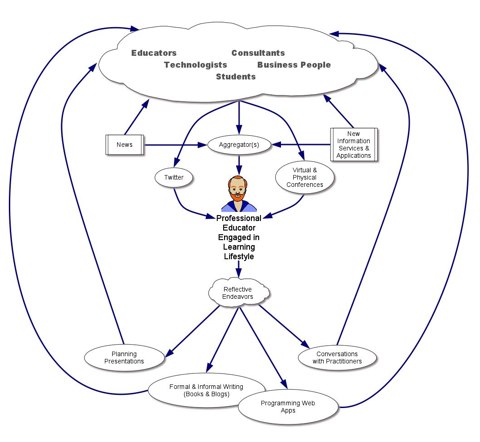
123, ABC, TCP/IP, and now PLN-the power of your personal learning network

Our school is seriously considering replacing our desktops for a more mobile approach.  We've tossed around the idea of netbooks throughout the fall and I've been the guinea pig with my Acer Aspire One.  (See my post/review of this netbook here.)  I've run this netbook through some pretty rigorous use and our tech department seems satisfied that these devices can handle just about any classroom app we can throw at it.  The only exception however seems to be in the area of video production but I have yet to try anything beyond a standard Youtube length.

With our concerns about the netbook's firepower behind us, we needed to look into the sturdiness, network connectivity, and mobility of these devices.  We looked at the Acer, HP, Asus, and Dell netbooks and we found that the Dell seemed to fit our needs the best.  Our next step was to contact another school that uses the Dell Latitude 2100 with the cart to validate what we thought was going to be a good match for us.

Now as an avid twitterer, I've been tweeting away about our thoughts to Dell Latitude 2100 and sure enough, @bkolani aka Basil Kolani from the Dwight School in NYC replied via twitter that his school deployed 5 netbook carts in the fall of 2009.  So we set up a Skype session where several members of our tech department were able to ask specific questions about their experience not only with the netbooks but the cart itself.

If interested, one may listen to our Skype conversation here.  It is unedited so be patient in the opening seconds.

After the Skype session our tech department was relieved that many of their ideas regarding the new direction had been validated.

There is nothing better than having a member of your PLN validate the potential direction and financial investment our school will be considering and for that I am truly grateful.


Dave Warlick's Picture of his Personal Learning Network

Sunday, November 15, 2009

A Step in the Right Direction-Kindle for PC

Now I've always wanted a Kindle but I couldn't justify the expense for another gadget that has limited capabilities. So after discussing netbooks, eBooks, and online texts at our last tech dept meeting, I decided to load the Kindle for PC software on my netbook.


Earlier this fall, I purchased the Acer Aspire One netbook and so far, this form factor has exceeded all of my expectations. The portability, weight, battery life, and performance of the netbook is why I consider it my main computer while I am on the go. With the addition of Kindle for PC software, I have now added a dimension to my computing environment that has been lacking; the ability to read books, magazines,and newspapers on my computer.

My first selection was Clay Shirky's book "Here Comes Everybody", and so far the experience has been quite good.  I have the ability to bookmark pages but I am unable to search, highlight or take notes.  However, it appears that the hide notes and marks features will be coming soon as they are listed in the drop down.

There also seems to be a bug on computers that synchronize My documents to a network folder. The bug has caused me to deregister and register the netbook to gain access to my purchase. An annoyance but the real bummer was when I lost my bookmarks.

When Amazon, implements those features and expands their offerings to include textbooks, schools will definitely be able to take advantage of lower cost texts and computers for their students.

Now what will make my world complete is when Amazon makes the Kindle software for the Blackberry so I can have access to my eBooks anywhere and anytime. And one other thing, let's be sure to synchronize my notes and bookmarks between the 2 devices.

But for now, the Kindle for PC is a step in the right direction.

Wednesday, October 14, 2009

An access model problem and my new netbook: The Acer Aspire One

As our school continues to explore new web 2.0 technologies, we've been experiencing greater pressures on our access model. Currently, St. Christopher's maintains a lab based access model. This model has served its purpose for a number of years but now the pressure is on. Despite our best efforts, scheduling time in the lab continues to be a problem. The 2 biggest obstacles are finding an open slot and then making sure that the lab has sufficient machines to handle the class size. Unfortunately, one lab only has 16 machines which causes teachers to shy away if they have to send some students to the library or the other lab.

So what does that mean? It means our teachers are integrating technology with greater frequency and they want to use more of it with their classes. But there is a caveat, they would like more access but without the headaches of juggling/jockeying for lab space or wondering if there will be sufficient computers to accommodate the class size.

The good news is that the MS is up for a replacement of its computers which has prompted our tech department to do some exploring and creative thinking. Soon thereafter, I came upon a tweet mentioning the Acer Education K-12 Seed Program. I took a look and determined it was a great opportunity to beta test a netbook in a school environment.


So here is how it worked. Essentially, Acer would give you a netbook to try out and after a given time period, one could either return it and just pay shipping or one could purchase the Acer Aspire One for $199.00 at the end of the trial period. That deal was simply too good to pass up so I signed up.

Upon receiving the netbook, I was immediately stunned by how light weight it was.  I've been a laptop/tablet user for quite some time and they just seemed like boat anchors by comparison.  The next thing that caught my eye was the screen.  It is super crisp and it supports a max resolution of 1024x600.  The keyboard is considerably more comfortable than the 2goPC tablet's but I wish the space bar were a bit more responsive towards the ends of the key.

The OS + upgrades
The netbook shipped with XP home sp3 which did surprisingly well but made it difficult to connect to network resources at our school because one cannot connect to the domain.  After using the netbook for about 2 weeks, I decided to switch to Win7 and I increased the memory to 2 GB(it ships w/ one). Let's just say I will never look back.  Win 7 runs great on a netbook and the RAM upgrade just made the overall experience that much better.

Putting the netbook through its paces
I've been using the netbook daily for several weeks now and I am impressed. I've run multiple programs concurrently while teaching and it has yet to hiccup. On several occassions, I've run Excel, Chrome, Synchroneyes, and Outlook without a noticeable decline in performance.  I've also projected wirelessly with this netbook but in this case video refresh did decline.  I have to test this again because I was still running Aero.  I have not tested video editing and rendering but I suspect it will handle short clips(2-3 min) without a problem.

Is this a viable device for students?
I would say yes. The size, weight, performance, and battery life make netbooks a nice alternative to a full fledged laptop.  The price point is particularly budget friendly for schools and parents and it is a nice alternative to the desktop/lab model.  It can provide the ubiquitous learning environment that models how our students will engage with technology in their daily lives.

I'll keep you posted on what we decide but wish us luck, because I know where I would like to go.